
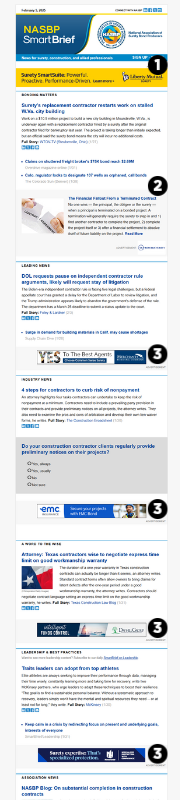
The NASBP SmartBrief click-through-rate is among the highest, if not the highest, among SmartBrief‘s entire suite of 200-plus newsletters! NASBP SmartBrief has an engaged readership! Now more than ever, professionals consume information on the go. Our NASBP SmartBrief eNewsletter allows members to stay informed about timely industry topics and Association news whether they are in the office or on the road.
Enjoy the benefits of a targeted eNewsletter:
Delivers your message directly to the inbox of 5,500 decision-makers on a regular basis
In addition to 5,500 members, opt-in subscription means that professionals in the market for your products and services see your message
Cross-promoted in other NASBP publications and communications pieces
Directs visitors to the landing page of your choice
Limited available ad space makes each position exclusive
Celebrating 15 Years of Surety Industry Insights
For 15 years, the NASBP SmartBrief has been the trusted source for delivering the latest news, trends, and insights in the surety industry. With a long-standing commitment to keeping professionals informed, our eNewsletter reaches key stakeholders, decision-makers, and industry leaders every week. Join us in celebrating this milestone and continue to stay ahead with the news that shapes the future of surety.
Distributed weekly. Sections include:
Bonding Matters
Leading News
Industry News
A Word To The Wise
Leadership & Best Practices
Association News
Tips & Takeaways
Opinion Poll Results
Leaderboard (728 x 90 pixels)
Only one spot available – NO ROTATION
Sponsored Content
Includes image (180 x 150 pixels) or company logo, title, teaser text up to 50 words, embedded link to article on suretybondquarterly.org. It’s recommended for the client to supply different title and teaser text for each week of the month (promoting the same article). The client may opt to send a different image for each week.
Horizontal Banner (468 x 60 pixels)
Only seven spots available – NO ROTATION
Placed next to content and visible the entire time the eNewsletter is being viewed
All advertisers will receive an invoice for the total amount, due upon activation.
Advertisements must be in JPG format (animation and Flash/SWF files are not accepted), and the total file size must not exceed 100kb. Contract advertisers may change their ad artwork once a month at no additional cost.
Advertisers will receive campaign performance reports that detail monthly ad impressions and click-throughs on an as-requested basis.
When renewing online ads, priority and first right-of-refusal will be given to advertisers who commit to 12 months. All other companies will be renewed on a first-come, first-served basis.
Disclaimer: Please note that the mockup shows overall newsletter layout, but exact ad location on the newsletter will vary based on the amount of editorial content supplied each issue.
Rates are net. Reservation is on a first-come, first-served basis.
Current Rates (SBP-N0025)
Cookie Consent
We use cookies so that we can remember you and understand how you use our site. By using our site, you consent to cookies.
Cookie Settings and Privacy Preferences
Naylor website may request cookies to be set on your device. We use cookies to let us know when you visit our websites, how you interact with us, to enrich your user experience, and to customize your relationship with Naylor, including providing you with more relevant advertising. Click on the different category headings to find out more. You can also change your cookie preferences. Note that blocking some types of cookies may impact your experience on our websites and the services we are able to offer.
Essential cookies enable basic functions and are necessary for the proper function of the website.
Name
Description
Duration
Cookie Preferences
This cookie is used to store the user's cookie consent preferences.
30 days
These cookies are needed for adding comments on this website.
Name
Description
Duration
comment_author_url
Used to track the user across multiple sessions.
Session
comment_author
Used to track the user across multiple sessions.
Session
comment_author_email
Used to track the user across multiple sessions.
Session
Google Tag Manager simplifies the management of marketing tags on your website without code changes.
Name
Description
Duration
cookiePreferences
Registers cookie preferences of a user
2 years
td
Registers statistical data on users' behaviour on the website. Used for internal analytics by the website operator.
session
Statistics cookies collect information anonymously. This information helps us understand how visitors use our website.
Google Analytics is a powerful tool that tracks and analyzes website traffic for informed marketing decisions.
Contains information related to marketing campaigns of the user. These are shared with Google AdWords / Google Ads when the Google Ads and Google Analytics accounts are linked together.
90 days
__utma
ID used to identify users and sessions
2 years after last activity
__utmt
Used to monitor number of Google Analytics server requests
10 minutes
__utmb
Used to distinguish new sessions and visits. This cookie is set when the GA.js javascript library is loaded and there is no existing __utmb cookie. The cookie is updated every time data is sent to the Google Analytics server.
30 minutes after last activity
__utmc
Used only with old Urchin versions of Google Analytics and not with GA.js. Was used to distinguish between new sessions and visits at the end of a session.
End of session (browser)
__utmz
Contains information about the traffic source or campaign that directed user to the website. The cookie is set when the GA.js javascript is loaded and updated when data is sent to the Google Anaytics server
6 months after last activity
__utmv
Contains custom information set by the web developer via the _setCustomVar method in Google Analytics. This cookie is updated every time new data is sent to the Google Analytics server.
2 years after last activity
__utmx
Used to determine whether a user is included in an A / B or Multivariate test.
18 months
_ga
ID used to identify users
2 years
_gali
Used by Google Analytics to determine which links on a page are being clicked
30 seconds
_ga_
ID used to identify users
2 years
_gid
ID used to identify users for 24 hours after last activity
24 hours
_gat
Used to monitor number of Google Analytics server requests when using Google Tag Manager